Showing posts with label CHEATS AND TRICKS ZONE. Show all posts
Sunday, 5 January 2014
0
Sunday, 5 January 2014
RECEIVE 100MB MONTHLY FROM ETISALAT (TECNO USERS ONLY)
For the owners of any TECNO phone (D5 and all Phantoms) supported by ETISALAT promo of 100MB,
I have found a solution to the promo. You can only receive the 100MB monthly if you subscribe to any of their data plans. So for those who subscribed to the BIS that was recently blocked,
just text HIGH to 8186 on your TECNO phone via the Etisalat sim.

I have found a solution to the promo. You can only receive the 100MB monthly if you subscribe to any of their data plans. So for those who subscribed to the BIS that was recently blocked,
just text HIGH to 8186 on your TECNO phone via the Etisalat sim.
Saturday, 4 January 2014
0
Saturday, 4 January 2014
HOW TO UNLOCK YOUR HUAWEI E303 MTN, ZAIN, GLO OR ETISALAT WITH FIRMWARE UPDATE VERSION
Hello everyone, If you are one of those using
a Huawei E303 modem and you have been
looking for a way to unlock your modem to
use others Sims of different network? then
this might work for you, I came across this
method and I will love to share it with you
How To Unlock Huawei E303 With
Firmware Update 21.157.31.00.850
Note: please follow very single step and it
will help you unlock your modem
permanently
[php]1. Download Universal Master Code
Calculator so that we get the FLASH CODE
below software download click here.
2. Insert your Imei code into "Universal
Master Code Calculator" the software that
you have above.
3. and you will get FLASH CODES that we are
going to use them as a PASSWORD in the
next step.
4. Download HUAWEI E303 firmware update
5. Unzip the file and make sure the modem
is connected and it has been installed with
the SIM card inside it.[/php]
Quit the software dashboard, then the run
the UPDATE you have downloaded and you
will be asked for the PASSWORD input the
FLASH CODE you got from the Universal
Master Code Calculator and then your
huawei E303 will be unlocked forever.
a Huawei E303 modem and you have been
looking for a way to unlock your modem to
use others Sims of different network? then
this might work for you, I came across this
method and I will love to share it with you
How To Unlock Huawei E303 With
Firmware Update 21.157.31.00.850
Note: please follow very single step and it
will help you unlock your modem
permanently
[php]1. Download Universal Master Code
Calculator so that we get the FLASH CODE
below software download click here.
2. Insert your Imei code into "Universal
Master Code Calculator" the software that
you have above.
3. and you will get FLASH CODES that we are
going to use them as a PASSWORD in the
next step.
4. Download HUAWEI E303 firmware update
5. Unzip the file and make sure the modem
is connected and it has been installed with
the SIM card inside it.[/php]
Quit the software dashboard, then the run
the UPDATE you have downloaded and you
will be asked for the PASSWORD input the
FLASH CODE you got from the Universal
Master Code Calculator and then your
huawei E303 will be unlocked forever.
0
AVG ANTIVIRUS & INTERNET SECURITY 2014 ONE YEAR LICENSE
After all those free antivirus trial products from different heavy brands, AVG steps in and provides you with another freebie promotional offer, so now you are going to get Free Antivirus and Internet Security suite for free for 1 full year. So earlier I used to use this AVG free edition and it was effective too but its paid security is worth to give a try at least now for free. This new 2014 version is easy to grab as it comes with an inbuilt key in the installer itself, so you just need to download and install the software on your computer.

So now this 2014 version comes with a new all improved privacy protect feature that protects all your stuff from cyber criminals and h*ckers all around. So now as you know the online treat is emerging on daily basis but now with AVG online community you get notified of all these viruses and malwares on the go and on daily basis, so as soon as something bad happens and you can act on it to protect your PC.
AVG Antivirus Windows Full Version Download Links
Well below are the link to you respected downloads, now note below links are hosted by Huawei so they are actually providing free keys for this awesome antivirus, so if below links are not working for you then this offer might not be available in your respected country.
0
KASPERSKY INTERNET SECURITY 2014 FREE 3 MONTHS LICENSE
Kaspersky is that antivirus that do not need any kind of introduction, small kids to big professional geeks trust this security suite for getting their computer's protected from all those online and offline threats. Well it does not top the list but still its considered as the best and people are ready to pay any amount for getting this protection.

Well but now you do not need to pay for any suite protection as we are bringing a free 3 months trial for this antivirus right to your PC. So now I have earlier posted many freebies on Kaspersky but I have merged all those into this post as some of them were expired or so. So now currently we are this as the latest Kaspersky freebie.
Kaspersky Internet Security 2014 brings many new features like its faster, lighter and smarter then before and it has been improved to provide you with faster shutdown, startup and other actions @ quick response rate.
Kaspersky's new cloud based detection feature allows you to track over 2,00,000 threats appearing daily and vanishing them away suing its in built hardcode tools. So overall it comes with a plenty of new features and improved interface that will allow you to boost your system performance and side by side maintain it virus free :)
Download Kaspersky Internet Security 2014 for Free
So now to get this awesome internet security package for free you need to follow below steps and get your product activated with 3 months genuine license.
1. Download KIS 2014 Software
2. So now download and install the above software in your computer.
3. When it asks for activation code provide below mentioned any one code.
QCGUH-J8FF6-33WGA-UBY62
4GGYH-S7HEJ-QEGXT-4C88H
33WG QCGUH-J8FF6-A-UBY62
4GGYH-S7HEJ-QEGXT-4C88H
QCGUH-J8FF6-33WGA-UBY62
4. So above codes will provide 91 days trial activation.
So now your Kaspersky Internet Security 2014 will be installed with a 91 days or 3 months trial that provides you with a full proof protection against all the threats mentioned above. Well do comment if this worked for you.

Well but now you do not need to pay for any suite protection as we are bringing a free 3 months trial for this antivirus right to your PC. So now I have earlier posted many freebies on Kaspersky but I have merged all those into this post as some of them were expired or so. So now currently we are this as the latest Kaspersky freebie.
Kaspersky Internet Security 2014 brings many new features like its faster, lighter and smarter then before and it has been improved to provide you with faster shutdown, startup and other actions @ quick response rate.
Kaspersky's new cloud based detection feature allows you to track over 2,00,000 threats appearing daily and vanishing them away suing its in built hardcode tools. So overall it comes with a plenty of new features and improved interface that will allow you to boost your system performance and side by side maintain it virus free :)
Download Kaspersky Internet Security 2014 for Free
So now to get this awesome internet security package for free you need to follow below steps and get your product activated with 3 months genuine license.
1. Download KIS 2014 Software
2. So now download and install the above software in your computer.
3. When it asks for activation code provide below mentioned any one code.
QCGUH-J8FF6-33WGA-UBY62
4GGYH-S7HEJ-QEGXT-4C88H
33WG QCGUH-J8FF6-A-UBY62
4GGYH-S7HEJ-QEGXT-4C88H
QCGUH-J8FF6-33WGA-UBY62
4. So above codes will provide 91 days trial activation.
So now your Kaspersky Internet Security 2014 will be installed with a 91 days or 3 months trial that provides you with a full proof protection against all the threats mentioned above. Well do comment if this worked for you.
Tuesday, 10 December 2013
0
Tuesday, 10 December 2013
NOKIA TODAY UNVEILED ITS LATEST ACCESSORY – THE BH-121 NFC BLUETOOTH STEREO HEADSET
Nokia Today Unveiled Its Latest Accessory – The BH-121 NFC Bluetooth Stereo Headset
Nokia today unveiled its latest accessory – the BH-121 NFC Bluetooth stereo headset.
Measuring 39 x 39 x 12mm, the Nokia BH-121 headset is slightly larger than the iPod Shuffle and is offered in cyan, red, yellow and black.

The headset is equipped with NFC and Bluetooth for pairing with your phone and features a large button on top used to answer calls and play music.
On its bottom there’s a 3.5mm headphone jack and a microUSB port for charging, while the right side holds a volume rocker and a microphone.
The BH-121 is bundled with Nokia’s WH-208 in-ear headphones that come in the same color as the main player.
Nokia says the headset supports advanced Bluetooth features like HFP/HSP and/or A2DP/AVRCP profiles as well as the Lumia 1520, Lumia 1320, Lumia 1020, Lumia 925,
625, 525, and the Asha 503 and Asha 501.
Expect the BH-121 to start hitting store shelves some time this month with a price tag €39.
Nokia today unveiled its latest accessory – the BH-121 NFC Bluetooth stereo headset.
Measuring 39 x 39 x 12mm, the Nokia BH-121 headset is slightly larger than the iPod Shuffle and is offered in cyan, red, yellow and black.
The headset is equipped with NFC and Bluetooth for pairing with your phone and features a large button on top used to answer calls and play music.
On its bottom there’s a 3.5mm headphone jack and a microUSB port for charging, while the right side holds a volume rocker and a microphone.
The BH-121 is bundled with Nokia’s WH-208 in-ear headphones that come in the same color as the main player.
Nokia says the headset supports advanced Bluetooth features like HFP/HSP and/or A2DP/AVRCP profiles as well as the Lumia 1520, Lumia 1320, Lumia 1020, Lumia 925,
625, 525, and the Asha 503 and Asha 501.
Expect the BH-121 to start hitting store shelves some time this month with a price tag €39.
Tuesday, 3 December 2013
0
Tuesday, 3 December 2013
How to continue using your airtel bis plan on non bb device even after blockage
As wel
all kwn that Airtel is always given
out free 15mb to all there club10
member. So u can nw secure ur
SUBRIPTION JUST BY MIGRATE TO
CLUP 10 AND LOAD #200. By the
time they give u 15mb they wil
add it wit the 1 u hav b4 and the
wil unable to deduct it. NOTE:
REPEAT THE PROSESS EVERY WEEK.
And mind u ur money wil nt be
deducted.
all kwn that Airtel is always given
out free 15mb to all there club10
member. So u can nw secure ur
SUBRIPTION JUST BY MIGRATE TO
CLUP 10 AND LOAD #200. By the
time they give u 15mb they wil
add it wit the 1 u hav b4 and the
wil unable to deduct it. NOTE:
REPEAT THE PROSESS EVERY WEEK.
And mind u ur money wil nt be
deducted.
Friday, 29 November 2013
0
Friday, 29 November 2013
HOW TO USE AND INSTALL BBM ON YOUR PC/LAPTOP
here is another way of installing BBM on PC, This time we need to use GenyMotion along with a suitable virtual device (like the Galaxy S4 / HTC One image running Android 4.2.2). We can install BBM inside GenyMotion either from the downloaded APK file, directly from Google Play or other android market I prefer 1 market which is another android market. But you may still run into problems while trying to run the BBM app inside GenyMotion. To ensure workability, please the following steps must be applied.
* Make sure Virtualization is enabled on your PC.
For Intel Processors, set the virtual RAM to at least half of the physical RAM.
For AMD Processors, turn on Virtualization from the BIOS Menu (Restart required).
Download Virtualization Here
Now How to install BBM on PC.
Download and Install GenyMotion HERE.
Launch Genymotion and login with your free Geny Motion log in details.
Click on the Add Button and connect to your account.
Select the “Galaxy S4/HTC One/Xperia Z-4.2.2-with Google Apps – API 17 – 1080×1920” image from available devices and click on Add.
Click on Create begin downloading the image. After download is complete, the image will automatically be added to your list of devices.
Now go back to GenyMotion and click the Play Button.
Once your virtual Android device is set up, Install BBM directly from Google Play, or from 1 market android store as seen from the video or from the APK file. The APK should be present inside Shared Folder in order to be accessible within GenyMotion.
When BBM is successfully installed, a shortcut will appear in Home Screen.
Launch BBM inside GenyMotion. The BBM Welcome screen will be displayed.
If you have used BBM before, you can sign in with your previous BlackBerry ID by clicking on the Sign in button.
If you are a new user, choose Create a BlackBerry ID option.
If you choose Create BlackBerry ID, a form will be presented for you to fill up.
Once you have completely filled up the form, accept the Terms Of Service and Privacy Policy and click on Create.
Click on Continue on the next screen to sign in with your newly created BlackBerry ID.
On the next screen, BBM will generate your unique BBM PIN that you can use to invite other BBM users to join you in conversation.
Upload a photo to complete your BlackBerry profile. You are now ready to use BBM and invite friends to chat with you.
WARNING: Before you proceed, ensure that your CPU supports Virtualization. BBM is reported to crash when running without virtualization.
If you are on Windows 8, open Task Manager >> Performance and see whether Virtualization is Enabled under CPU menu.
Hope it Helps ...please use the share button to share this post to all you
* Make sure Virtualization is enabled on your PC.
For Intel Processors, set the virtual RAM to at least half of the physical RAM.
For AMD Processors, turn on Virtualization from the BIOS Menu (Restart required).
Download Virtualization Here
Now How to install BBM on PC.
Download and Install GenyMotion HERE.
Launch Genymotion and login with your free Geny Motion log in details.
Click on the Add Button and connect to your account.
Select the “Galaxy S4/HTC One/Xperia Z-4.2.2-with Google Apps – API 17 – 1080×1920” image from available devices and click on Add.
Click on Create begin downloading the image. After download is complete, the image will automatically be added to your list of devices.
Now go back to GenyMotion and click the Play Button.
Once your virtual Android device is set up, Install BBM directly from Google Play, or from 1 market android store as seen from the video or from the APK file. The APK should be present inside Shared Folder in order to be accessible within GenyMotion.
When BBM is successfully installed, a shortcut will appear in Home Screen.
Launch BBM inside GenyMotion. The BBM Welcome screen will be displayed.
If you have used BBM before, you can sign in with your previous BlackBerry ID by clicking on the Sign in button.
If you are a new user, choose Create a BlackBerry ID option.
If you choose Create BlackBerry ID, a form will be presented for you to fill up.
Once you have completely filled up the form, accept the Terms Of Service and Privacy Policy and click on Create.
Click on Continue on the next screen to sign in with your newly created BlackBerry ID.
On the next screen, BBM will generate your unique BBM PIN that you can use to invite other BBM users to join you in conversation.
Upload a photo to complete your BlackBerry profile. You are now ready to use BBM and invite friends to chat with you.
WARNING: Before you proceed, ensure that your CPU supports Virtualization. BBM is reported to crash when running without virtualization.
If you are on Windows 8, open Task Manager >> Performance and see whether Virtualization is Enabled under CPU menu.
Hope it Helps ...please use the share button to share this post to all you
0
SIMPLE STEPS TO USE YOUR BLACKBERRY AS MODEM
Using your Blackberry smart
phone As A Modem
Please do your self a favour by
adhering strictly to this steps on
how to browse with your PC
using your Blackberry as a
Modem or you might end up
loosing bunch of hairs trying to
achieve a successful connection
Get your modem and have it
subscribed to any data plan of
your choice
nw Download Blackberry
Desktop
software.
BlackBerry® Desktop
Software for PC coordinates the
link between your smartphone,
tablet, email accounts, calendars
and more. you can
download
the latest version of dat here
It is
available for both Mac and Pc
Users.
After downloading it, you can
install it on your using the step
by step installation wizard
Go to the menu, and click on
tools >> Mobile internet
settings
Next,You shall see Profile Drop-
down menu. Click on the
Add
Custom Profile to configure
with any Network settings or
configuration. If you check
properly, you will dicover that
No Nigerian mobile network
Operator is listed in it.
so you
will have to do that yourself by
adding a custom profile
Settings for Mtn Users
MTN NG
profile name MTN NG
username: web
password: web
access point:
Web.gprs.mtnnig
eria.net
Now Go back to the Menu.
After menu>> click on Tools and
>>click on
Start Mobile
Internet.
Click on Connect
Finally, you have Successfully
Connected yourself to the
Internet. You can now nod your
head and start browsing,
Note after following all these
steps, dont close the blackberry
Desktop Software until you are
finnally through with your
browsing.
DATS ALL.....
phone As A Modem
Please do your self a favour by
adhering strictly to this steps on
how to browse with your PC
using your Blackberry as a
Modem or you might end up
loosing bunch of hairs trying to
achieve a successful connection
Get your modem and have it
subscribed to any data plan of
your choice
nw Download Blackberry
Desktop
software.
BlackBerry® Desktop
Software for PC coordinates the
link between your smartphone,
tablet, email accounts, calendars
and more. you can
download
the latest version of dat here
It is
available for both Mac and Pc
Users.
After downloading it, you can
install it on your using the step
by step installation wizard
Go to the menu, and click on
tools >> Mobile internet
settings
Next,You shall see Profile Drop-
down menu. Click on the
Add
Custom Profile to configure
with any Network settings or
configuration. If you check
properly, you will dicover that
No Nigerian mobile network
Operator is listed in it.
so you
will have to do that yourself by
adding a custom profile
Settings for Mtn Users
MTN NG
profile name MTN NG
username: web
password: web
access point:
Web.gprs.mtnnig
eria.net
Now Go back to the Menu.
After menu>> click on Tools and
>>click on
Start Mobile
Internet.
Click on Connect
Finally, you have Successfully
Connected yourself to the
Internet. You can now nod your
head and start browsing,
Note after following all these
steps, dont close the blackberry
Desktop Software until you are
finnally through with your
browsing.
DATS ALL.....
0
HOW TO TRANSFER MB DATA BUNDLE ON GLO MOBILE SIMS
How To Share Your Data Plan With Multiple Users Only glo bolt internet service allow you to share your data plans easily with your friends and family, anytime. Enjoy glo bolt internet service anytime, anywhere with anyone. You can you now share your Glo bolt internet service to all your devices without the stress, you do not need individual subscription of glo data planon each devices separately, control everyone from one single subscription. How To Share Your Glo Bolt Internet Service With Anyone Adding Mobile Number On Glo Bolt Data Sharing ==>> Dial*127*01* Receivers Number #eg *127 * 01* 08055123123# To Remover User Phone Numbers On Your Glo Bolt Data Sharing ==>>Dial *127*02* Receivers Number #Eg *127*02* 08055123456#.
0
Do you have a presentation or a complex JavaScript based web apps you want to showcase? Then, you can take the advantage of Google free CDN service. Google has several servers across the globe and we can be sure that a file downloaded from Google server will be much faster compare to our shared hosting server. But there's a little drawback. Google Drive websites have a URL structure like googledrive.com/host/ and there’s no way to change the default URL.
For instance, if your are hosting a website on Google Drive but wish to serve it under your own custom domain, that’s not possible yet unless you wrap your Google Drive website URL inside an iframe tag as shown in the following snippet:
You can see a live demo of a static webpage hosted on Google Drive here.
This guide assumes you already have some HTML content you’d like to publish. Now let's get these done.
1. Login to drive.google.com
2. Select Create > Folder
3. Give your folder any title you like
4. Now that a new folder is created. Select the check box next to the folder
5. Select the Share settings icon
6. In the next pop up window, click on "Change" under "Who has access" section.
7. Make your folder "Public on the web", Save your changes, then click Done.
8. Open your newly created folder and you can see it's empty. It's time to upload your files.
9. Click the "Upload" icon, then "Files"
10. Open your uploaded file and click the "Open" with Google Drive Viewer button below the page.
Click "Preview". The string of characters after "host" in your address bar is your page id. You can share the page URL with anyone.
As the owner of the account, you can access (and edit) your files via http://drive.google.com/page-id
Visitors can access it via http://googledrive.com.com/page-id
HOW TO HOST A WEBSITE OR FILE ON GOOGLE DRIVE
Do you have a presentation or a complex JavaScript based web apps you want to showcase? Then, you can take the advantage of Google free CDN service. Google has several servers across the globe and we can be sure that a file downloaded from Google server will be much faster compare to our shared hosting server. But there's a little drawback. Google Drive websites have a URL structure like googledrive.com/host/ and there’s no way to change the default URL.
For instance, if your are hosting a website on Google Drive but wish to serve it under your own custom domain, that’s not possible yet unless you wrap your Google Drive website URL inside an iframe tag as shown in the following snippet:
<html>
<head>
<style>
.body { margin: 0; padding: 0;}
.iframe { position: absolute; height:100%; width:100%;}
</style>
<title> Google Drive Website </title>
</head>
<body>
<iframe src = "https://googledrive.com/host/FILE-ID/" frameborder= "0"></iframe>
</body>
</html>
<head>
<style>
.body { margin: 0; padding: 0;}
.iframe { position: absolute; height:100%; width:100%;}
</style>
<title> Google Drive Website </title>
</head>
<body>
<iframe src = "https://googledrive.com/host/FILE-ID/" frameborder= "0"></iframe>
</body>
</html>
You can see a live demo of a static webpage hosted on Google Drive here.
This guide assumes you already have some HTML content you’d like to publish. Now let's get these done.
1. Login to drive.google.com
2. Select Create > Folder
3. Give your folder any title you like
4. Now that a new folder is created. Select the check box next to the folder
5. Select the Share settings icon
6. In the next pop up window, click on "Change" under "Who has access" section.
7. Make your folder "Public on the web", Save your changes, then click Done.
8. Open your newly created folder and you can see it's empty. It's time to upload your files.
9. Click the "Upload" icon, then "Files"
10. Open your uploaded file and click the "Open" with Google Drive Viewer button below the page.
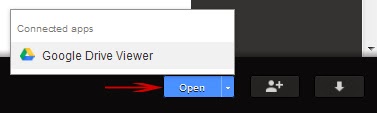
Click "Preview". The string of characters after "host" in your address bar is your page id. You can share the page URL with anyone.
As the owner of the account, you can access (and edit) your files via http://drive.google.com/page-id
Visitors can access it via http://googledrive.com.com/page-id
You might also like:
0
How to install Android Apps straight to your Blackberry
Hope you've heard about the latest
Blackberry 10.2.0.424 firmware
upgrade yeah its awesome, I think
Blackberry is really coming up, with the
upgrade your Blackberry 10 device can
accept and install any android file
without slide loading the Android App
using DDPB software
Here is How
If you have upgraded to the latest OS
version 10.2.0.424
Download Runtime unlocked version
10.2.1.13
Blackberry 10.2.0.424 firmware
upgrade yeah its awesome, I think
Blackberry is really coming up, with the
upgrade your Blackberry 10 device can
accept and install any android file
without slide loading the Android App
using DDPB software
Here is How
If you have upgraded to the latest OS
version 10.2.0.424
Download Runtime unlocked version
10.2.1.13
Click HERE to Download
When the file is extracted, you will find
two BAR files that will be slide load on
our device using the slide load DDPB
method, or using any of the BB10 slide
loading Tool, or you can even use the
App Manager of Google Chrome
methods to load the app.
After you have installed the two files of
the Runtime Unlocked on your device,
simply reboot your device Now you can
start installing Android applications
without slide loading.
Learn more About slide loading Here
Hope it Helps....please use the share
button to share this post with your
friends.
0
Everyone knows about AdSense behaviour towards Website/blogs who do not follow their terms & privacy policy. If you do so, You will get banned to your website, Banned means you can not use AdSense ads again on your website & It can even de-indexed from Google search.
HOW TO RE-PARTICPATE GOOGLE ADSENSE AFTER BEEN DISAPPROVED
Everyone knows about AdSense behaviour towards Website/blogs who do not follow their terms & privacy policy. If you do so, You will get banned to your website, Banned means you can not use AdSense ads again on your website & It can even de-indexed from Google search.
Before some days ago, we have posted a post about How to check whether your website is banned or not?. This post will help you to check Banned website by Adsense. If your website is banned, then i can hope the below steps may help you to Unbanned your website from AdSense.
Send an Google Reconsideration Request to AdSense
You can send Google a Reconsideration request if your website is de-indexed from google search, Just search site:yourdomain.com in Google. If it result in no pages found then you can go for reconsideration request from http://support.google.com/webmasters/bin/answer.py?hl=en&answer=35843
Be Relax & Polite
Google Consideratin form will ask for more about what happened: what actions might have led to any penalties, and what corrective actions have been taken. If you used a search engine optimization (SEO) company, please note that. Describing the SEO firm and their actions is a helpful indication of good faith that may assist in evaluation of reconsideration requests, etc
Verify the Website
Now, login to your Google webmaster account and add and verify your site. Make sure you have filled reconsideration form after verifying your website/Blog. Also You can send the information in an email to help@google.com. This is where Google representatives give support to customers.
Are you a Spammer?
(If your blog is de-indexed from Google) Some time Google ban those who spam lot aroud through paid links, malware etc. “Webspam” refers to pages that try to trick Google into ranking them highly. Just report to Google if you are not.
Be ready with Proof
You need real proof for Google re-inclusion, not just blame or acting stupid. Show them the proof of the changes you made for Google reconsideration. And at last, always be considerate and thank them for the time and effort that they are taking to look into your reconsideration request to Google and help you to solve the problems.
Be Relax & Keep patient
Be patient Because Google will take some time to Unbanned you from its records, It may take 1 week to 6 month depending upon your situation.
If you follow each steps carefully & cleverly then you may unbanned your banned website / Blog from Google AdSense. Comment your if your Blog ever Banned by Google?
Friday, 15 November 2013
0
Friday, 15 November 2013

Android 4.4 (KitKat) is here! This is how you apply the official upgrade by yourself - you don't even have to be root!
1. Get the update directly from Google: Android 4.4 kit kat Update from google here
2. Get and install / unzip ADB: http://developer.android.com/sdk/index.html
3. Connect your phone via USB with your computer
4. Open the console (in Windows it's via the command cmd)
5. Type in the following commands (you'll have to be root in Linux):
adb devices (will show the ID of your device)
adb reboot recovery (will reboot your device into recovery mode)
6. When your phone shows an Android with a red exclamation mark, do the following: Press and hold power, press and release volume up, release power. A menu will be shown.
7. Select the entry about ADB by pressing the volume keys, approve by pressing the power button.
8. Type in the console (PC):
adb sideload Path/To/Google's/Downloaded/Zip.zip
9. Wait for the installation to finish.
10. Have fun with Android 4.4! :)
PS: In case you get the error: insufficient permissions for device, type adb kill-server in your console and try again.
UPGRADE YOUR ANDROID PHONES TO ANDROID 4.4 KIT KAT HERE SEE SETUP

Android 4.4 (KitKat) is here! This is how you apply the official upgrade by yourself - you don't even have to be root!
1. Get the update directly from Google: Android 4.4 kit kat Update from google here
2. Get and install / unzip ADB: http://developer.android.com/sdk/index.html
3. Connect your phone via USB with your computer
4. Open the console (in Windows it's via the command cmd)
5. Type in the following commands (you'll have to be root in Linux):
adb devices (will show the ID of your device)
adb reboot recovery (will reboot your device into recovery mode)
6. When your phone shows an Android with a red exclamation mark, do the following: Press and hold power, press and release volume up, release power. A menu will be shown.
7. Select the entry about ADB by pressing the volume keys, approve by pressing the power button.
8. Type in the console (PC):
adb sideload Path/To/Google's/Downloaded/Zip.zip
9. Wait for the installation to finish.
10. Have fun with Android 4.4! :)
PS: In case you get the error: insufficient permissions for device, type adb kill-server in your console and try again.
0
WP 8.1 BLUE TO PREMIERE ON NOKIA GOLDFINGER AND MONEYPENNY
WP 8.1 Blue to premiere on Nokia
Goldfinger and Moneypenny
While Nokia and Microsoft are yet to roll out the GDR3 update with Lumia Black customizations, the rumor mill is already looking ahead for the next year's WP 8.1 Blue release.
The WP 8.1 Blue has been in the rumorland for a while and all reports so far suggest it will finally bring notification center, better multi-tasking and a Siri-like Cortana voice
assistant.
The WP 8.1 is expected to be announced at the upcoming MWC in The WP 8.1 is expected to be announced at the upcoming MWC in
Barcelona early next year.
The famous @evleaks tipster struck again today with another juicy rumor - the upcoming WP 8.1 Blue will debut on two Lumia devices codenamed Goldfinger and
Moneypenny. There are no specifications of either of those provided just yet, but it is believed the Goldfinger will be the
flagship model with the Nokia's long developed "3D Touch" technology.

The 3D Touch is something similar to Galaxy S4's Air Gestures, but it will be much more advanced. Different dedicated hardware sensor will track and recognize your hand movements for advanced gesture controls.
Will that be enough to finally make the smartphone game the three horse-race Elop was talking about when Nokia
switched to WP? Only time will tell, we guess.
Goldfinger and Moneypenny
While Nokia and Microsoft are yet to roll out the GDR3 update with Lumia Black customizations, the rumor mill is already looking ahead for the next year's WP 8.1 Blue release.
The WP 8.1 Blue has been in the rumorland for a while and all reports so far suggest it will finally bring notification center, better multi-tasking and a Siri-like Cortana voice
assistant.
The WP 8.1 is expected to be announced at the upcoming MWC in The WP 8.1 is expected to be announced at the upcoming MWC in
Barcelona early next year.
The famous @evleaks tipster struck again today with another juicy rumor - the upcoming WP 8.1 Blue will debut on two Lumia devices codenamed Goldfinger and
Moneypenny. There are no specifications of either of those provided just yet, but it is believed the Goldfinger will be the
flagship model with the Nokia's long developed "3D Touch" technology.
The 3D Touch is something similar to Galaxy S4's Air Gestures, but it will be much more advanced. Different dedicated hardware sensor will track and recognize your hand movements for advanced gesture controls.
Will that be enough to finally make the smartphone game the three horse-race Elop was talking about when Nokia
switched to WP? Only time will tell, we guess.
0
SAMSUNG SAID TO LAUNCH A DEVICE WITH WRAPAROUND SCREEN NEXT YEAR
Samsung said to launch a device with
wraparound screen next year
According to a report released by Bloomberg, Samsung has plans to release a smartphone with wraparound display at
some point next year. The new screen tech will allow users to look up messages or stocks from an angle.

The upcoming device is said to use updated version of proprietary Samsung technology called Youm. It was showcased during CES this year, and is currently featured in the Samsung Galaxy Round .
Speculation points that the new three-sided display can be seen in ether a Galaxy S, or a Galaxy Note device. An altogether new model family is also not out of question.
Curiously, the report about the yet to be released Samsung smartphone comes hot on the heels of similar news about Apple. A few days ago, word got out that Apple itself is working on two large-screen iPhone models with curved display.
wraparound screen next year
According to a report released by Bloomberg, Samsung has plans to release a smartphone with wraparound display at
some point next year. The new screen tech will allow users to look up messages or stocks from an angle.
The upcoming device is said to use updated version of proprietary Samsung technology called Youm. It was showcased during CES this year, and is currently featured in the Samsung Galaxy Round .
Speculation points that the new three-sided display can be seen in ether a Galaxy S, or a Galaxy Note device. An altogether new model family is also not out of question.
Curiously, the report about the yet to be released Samsung smartphone comes hot on the heels of similar news about Apple. A few days ago, word got out that Apple itself is working on two large-screen iPhone models with curved display.
0
APPLE IOS 7.0.4 UPDATE IS NOW SEEDING TO COMPATIBLE DEVICES
Apple iOS 7.0.4 update is now seeding to compatible devices
Apple began seeding an iOS 7 update to users of compatible devices. Numbered 7.0.4, the latest iOS version offers minor
improvements compared to 7.0.3 which was released last month .

The update fixes the FaceTime issue which bothered some iOS 7 users (an iOS 6 update has addressed the same problem
for owners of older devices). The usual host of improvements and bug fixes has also been included in iOS 7.0.4.
Alongside the iOS update, Apple also refreshed its iBooks and iTunes U apps today. The applications now feature a
complete redesign in line with the look of iOS 7.
Apple began seeding an iOS 7 update to users of compatible devices. Numbered 7.0.4, the latest iOS version offers minor
improvements compared to 7.0.3 which was released last month .
The update fixes the FaceTime issue which bothered some iOS 7 users (an iOS 6 update has addressed the same problem
for owners of older devices). The usual host of improvements and bug fixes has also been included in iOS 7.0.4.
Alongside the iOS update, Apple also refreshed its iBooks and iTunes U apps today. The applications now feature a
complete redesign in line with the look of iOS 7.
Thursday, 31 October 2013
0
Thursday, 31 October 2013
HOW TO USE YOUR #100/ MONTH AIRTEL UNLIMITED WHATSAPP PACKAGE ON YOUR ANDROID BBM MESSENGER
I hope you guys are really
enjoying the BBM messenger on
your android smartphones?
Well am here to introduce you to
this trick on how to make use of
both your whatsapp messenger
and BBM messenger for just
#100 per month.
This trick goes to all airtel users,
Normally airtel enables us to
subscribe our whatsapp for just
#100 per month which is pretty
cool, But do you know that
subscribing for the airtel
whatsapp messenger then your
BBM is automatically active.
Follow this below procedure:-
Step 1:- Subscribe for airtel data
whatsapp messeger by dialing
*948#, then your airtel 1month
data package is on for
whatsapp.
Note:- Your BBM messenger
won't work instantly
.
Step 2:- Move to your data on
your android mobile and make
sure its off. Then go to your BBM
messenger and send someone a
text.
Note: Once you send the text it
would hang!!!
Finally just go back and switch
on your data then your text
would proceed.
Now you can start surfing the
BBM messenger and the
Whatsapp messenger with just
#100 per month with your airtel
line.
If you have any questions just lay
down a comment and we would
be glad to attend to you.
Don't forget to share this topic
by clicking on the share links
Above.
enjoying the BBM messenger on
your android smartphones?
Well am here to introduce you to
this trick on how to make use of
both your whatsapp messenger
and BBM messenger for just
#100 per month.
This trick goes to all airtel users,
Normally airtel enables us to
subscribe our whatsapp for just
#100 per month which is pretty
cool, But do you know that
subscribing for the airtel
whatsapp messenger then your
BBM is automatically active.
Follow this below procedure:-
Step 1:- Subscribe for airtel data
whatsapp messeger by dialing
*948#, then your airtel 1month
data package is on for
whatsapp.
Note:- Your BBM messenger
won't work instantly
.
Step 2:- Move to your data on
your android mobile and make
sure its off. Then go to your BBM
messenger and send someone a
text.
Note: Once you send the text it
would hang!!!
Finally just go back and switch
on your data then your text
would proceed.
Now you can start surfing the
BBM messenger and the
Whatsapp messenger with just
#100 per month with your airtel
line.
If you have any questions just lay
down a comment and we would
be glad to attend to you.
Don't forget to share this topic
by clicking on the share links
Above.
Wednesday, 30 October 2013
0
Wednesday, 30 October 2013
HOW TO FIND IMEI NUMBER OFYOUR STOLEN / LOST ANDROIDPHONE
After buying a new mobile phone be it
nokia, blackberry, android, iphone, it is expected of us to write down the IMEI number to serve as means of claiming ownership of the phone should in case it got stolen or lost.so
many of us fail to do that and as a result of that, would not be able to
claim or block such phone if found.

However Today i am going to share with you on how to find the IMEI number of your lost/stolen android phone.
Remember google is the owner of android OS and such requires one to
use their gmail account to fully install and synchronize the android
packages such as phone details, network etc. with this you can easily get your IMEI if the phone was stolen or lost. this is why i always encourage my fans to create a new gmail account for their
android phones. Its never a good idea to use your private gmail to install or
synchronize when you bought new android phone like samsung galaxy, techno N3, N7, F7, htc, Sony experia etc because when the phone is stolen or lost, that means you have
automatically give the person access to your private email to control, guess you wouldn't want that to happen.
PROCEDURES TO FIND THE IMEI OF YOUR ANDROID PHONES
1. Visit gmail.com on your computer and login using the email you used to
install your android phone when you first bought it.when you are logged in, click on account at the left top corner of the page and then click on dashboard or you can just go directly using this link dashboard settings.
2. From the dashboard, you will see ANDROID, click on it, it will display all the device you have attached to the email and the IMEI number.
you can then write it down some where for reference purpose. that's
all.
Hope its helpful??
nokia, blackberry, android, iphone, it is expected of us to write down the IMEI number to serve as means of claiming ownership of the phone should in case it got stolen or lost.so
many of us fail to do that and as a result of that, would not be able to
claim or block such phone if found.

However Today i am going to share with you on how to find the IMEI number of your lost/stolen android phone.
Remember google is the owner of android OS and such requires one to
use their gmail account to fully install and synchronize the android
packages such as phone details, network etc. with this you can easily get your IMEI if the phone was stolen or lost. this is why i always encourage my fans to create a new gmail account for their
android phones. Its never a good idea to use your private gmail to install or
synchronize when you bought new android phone like samsung galaxy, techno N3, N7, F7, htc, Sony experia etc because when the phone is stolen or lost, that means you have
automatically give the person access to your private email to control, guess you wouldn't want that to happen.
PROCEDURES TO FIND THE IMEI OF YOUR ANDROID PHONES
1. Visit gmail.com on your computer and login using the email you used to
install your android phone when you first bought it.when you are logged in, click on account at the left top corner of the page and then click on dashboard or you can just go directly using this link dashboard settings.
2. From the dashboard, you will see ANDROID, click on it, it will display all the device you have attached to the email and the IMEI number.
you can then write it down some where for reference purpose. that's
all.
Hope its helpful??
Friday, 25 October 2013
0
Friday, 25 October 2013
DELETE YOUR FACEBOOK MESSAGES IN BULK USING THIS SCRIPT
You might get a lot of messages on regular basis regarding something or other and this can usually mess up your inbox, if you think you have so many messages that needs to be wiped away well we have a simple, easy and fast solution for you that allows you to delete your Facebook messages in bulk and get rid of all those conversations, well we will using a simple script that simply goes through all your messages and then simply runs the delete command on all of them hence getting rid of them easily and really fast.
Well this process might take some repetitions as at one time it clears almost 10-20 messages. So as it clears your conversation down you can easily click it once more to start clearing your other messages and then you can reload your INBOX and follow the process again to clean rest of your conversation.
1. Make sure your Bookmark Bar is enabled on Chrome & Firefox.
2. Now just drag Delete Messages to your Bookmarks bar.
Well this process might take some repetitions as at one time it clears almost 10-20 messages. So as it clears your conversation down you can easily click it once more to start clearing your other messages and then you can reload your INBOX and follow the process again to clean rest of your conversation.
1. Make sure your Bookmark Bar is enabled on Chrome & Firefox.
2. Now just drag Delete Messages to your Bookmarks bar.
3. Now visit your Facebook INBOX and just click on the Delete Message bookmark and see how the bookmark automatically scans and delete your messages.
4. Well if you get any Prompt like "Delete Conversation" just press the button, else it will do the whole process automatically
Subscribe to:
Posts
(
Atom
)


